Series: Vulnerability Management
This article outlines practical steps for developing a modern vulnerability management program, based on real-world experience, covering free tools, patching, and reporting.
Read my previous article in the series: Free Vulnerability Scanning with OpenVAS: Essential Eight.
A Real-World Guide
A vulnerability scanner alone will not secure your organisation. Effective security requires a structured plan to identify assets, prioritise risks, enhance patching, and demonstrate measurable results.
This guide details a practical, cost-effective approach I used to establish a vulnerability management program, including asset discovery and automated reporting.
1. Identify Your Assets Through Stakeholder Conversations
Before initiating scans, engage key personnel, including system administrators, web developers, programmers, network engineers, and cloud owners. Ask about existing systems, websites, networks, and infrastructure. These discussions help uncover:
- Shadow IT
- Forgotten servers
- Unsupported applications
- Misunderstood ownership
Document systems that cannot be scanned, such as OT/ICS environments, medical devices, or legacy systems. List these as scoped exclusions, assign a risk owner, and record the rationale for acceptance. Failing to document exclusions introduces hidden risk.
This step establishes your baseline and builds relationships essential for the program’s success.
Management is your primary stakeholder; obtain their approval before conducting vulnerability scans. Present a clear, structured plan outlining the scope, systems involved, and scan schedule. This approach ensures transparency, prevents surprises, and avoids disruptions to critical operations.
2. Validate With Vulnerability Scanning
After identifying expected assets, verify their presence by conducting vulnerability scans over several weeks across internal networks, public-facing websites, servers, end-user devices, and cloud workloads.
Start with a free scanner such as OpenVAS. Depending on your organisation’s needs, consider Nessus Essentials (free for small environments), Greenbone Community Edition, or commercial solutions like Microsoft Defender Vulnerability Management, Tenable Nessus, Qualys, or Rapid7 InsightVM.
This process reveals your actual asset inventory, establishes a vulnerability baseline, and highlights gaps between documented and active systems. Asset discovery is fundamental to every vulnerability management plan.
3. Assess, Fix, and Improve Your Patch Management
Patching is where vulnerability management translates into tangible risk reduction. Address this through three stages:
Understand your current state
Begin by mapping your organisation’s current patching processes.
Key questions to answer:
- Do you use WSUS (Windows Server Update Services), Intune (Microsoft Endpoint Manager), SCCM (System Centre Configuration Manager), or manual patching?
- Are OS updates automated?
- Are third-party applications patched?
- How are servers patched and rebooted?
- How are network devices updated?
- How are websites and CMS platforms maintained?
This step identifies operational gaps that contribute to vulnerabilities.
Fix the low-hanging fruit first.
Prioritise quick wins before larger projects, such as addressing missing OS updates, outdated applications, unsupported software, plugins, and server reboots. These actions provide immediate risk reduction and early success.
Implement high-impact improvements
Once the basics are handled, move toward strategic investments:
- Enable automatic patching for end-user devices via Intune
- Create scheduled patch windows for servers
- Stagger patch cycles to avoid downtime
- Deploy a dedicated patch management platform
- Automate third-party application updates
These measures enhance security maturity and decrease manual patching requirements.
4. Define Your Remediation SLAs
A common gap in early vulnerability management programs is the lack of defined remediation SLAs. Without them, there is no objective way to measure program performance or escalate when systems remain unpatched.
SLAs should be defined by severity and agreed upon by both IT leadership and the business. A practical starting point:
Vulnerability Remediation SLAs
| Severity | CVSS Range | Remediation SLA | Patching Timeframe | Examples | Notes |
| Critical | 9.0–10.0 | 14 days | Within 48 hours | RCE, active exploit in the wild | Escalate immediately; patch priority systems first |
| High | 7.0–8.9 | 30 days | Within 2 weeks | Privilege escalation, exposed services | Track in monthly report; include internet-facing assets |
| Medium | 4.0–6.9 | 90 days | Within 1 month | Misconfiguration, outdated software | Include in patch cycle; cover workstations and internal servers |
| Low | 0.1–3.9 | 180 days | Within 1 month | Info disclosure, minor config issues | Review quarterly; defer if risk is negligible |
These timelines provide a practical baseline and should be adjusted to fit your organisation’s risk profile and operational capacity. They are targets and the value lies in tracking performance over time rather than expecting immediate full compliance.
Severity vs Business Impact
Severity reflects the technical risk of a vulnerability. Business impact reflects the organisational risk. A Medium vulnerability on a critical payroll, finance, or customer‑facing system may be treated as High or Critical because the business impact outweighs the technical score.
CVSS Explanation
CVSS (Common Vulnerability Scoring System) is an industry standard that rates vulnerabilities based on exploitability and impact. It helps prioritise remediation by giving each vulnerability a score from 0 to 10.
5. Tracking Progress
I used OpenVAS reporting, Excel, and our ITSM software to track vulnerabilities from discovery to closure. Each finding was assigned as a ticket with an SLA and an open job for updates. This created a single source for remediation progress and made escalation straightforward.
With SLAs established, monthly reports become more impactful. In addition to vulnerability counts, include SLA breach rates to clearly show leadership whether remediation efforts align with risk levels.
Your ITSM platform is especially valuable here:
- Create a ticket for each vulnerability or affected asset.
- Assign it to the system owner.
- Apply the appropriate SLA.
- Track updates, comments, and remediation evidence in one
6. Build a Formal Exceptions Process
Not all vulnerabilities can be patched immediately. Legacy systems, production requirements, vendor-managed environments, and operational constraints may delay patching. These situations are common but must be managed through a formal process.
Without a documented exceptions process, teams may defer patches verbally with no record, leading to deferrals becoming permanent. Your vulnerability count can appear stable while real risk increases, which auditors and regulators will notice.
What a Good Exception Process Covers
- Who can approve an exception? Usually, the risk owner is at the manager level or above.
- Maximum exception duration, typically 30, 60, or 90 days, depending on severity.
- Compensating controls are required while the exception is active, for example:
- network segmentation
- restricted access
- enhanced monitoring
- temporary authentication or logging requirements
- These controls reduce exposure until the vulnerability can be fixed.
- A mandatory review date exception must be reviewed and re‑approved, not auto‑renewed.
- A named owner and a simple register track the system, the vulnerability, the exception period, compensating controls, and the review date. Highlight open exceptions in monthly reports to keep leadership aware of accepted risk.
The goal isn’t to make exceptions difficult, it’s to ensure they’re visible, justified, and time‑limited. A clear process gives teams a legitimate path when remediation isn’t immediately possible, without weakening the overall program.
7. Manage High-Maintenance Systems With Monthly Cadence Meetings.
Every organisation has a handful of systems that can’t be patched. Most organisations have systems that cannot be patched automatically, require manual intervention, or are managed by teams needing regular follow-up. Establish a monthly review meeting dedicated to these systems and use it to: identify what needs patching and agree on timelines.
- Track progress against previous commitments
- Review any open exceptions and confirm they’re still valid
At this stage, vulnerability management is both technical and relationship-driven. Monthly meetings sustain momentum for systems that would otherwise be neglected.
8. Report, Measure, and Demonstrate Your ROI
Reporting increases program visibility and supports ongoing investment. Effective reports turn technical results into business narratives that resonate with leaders.
For example, a typical executive summary might include:
- Total vulnerabilities (critical, high, medium, low) and monthly comparison
- Percentage of vulnerabilities remediated within SLA
- Trends showing reduction in critical and high vulnerabilities (with sample graphs or before/after snapshots)
- Key actions this month, such as patching legacy systems or automating updates
- Notable exceptions, open risks, and their owners and cost or hours saved through automation.
Conclusion: Vulnerability Management Is a Cycle, Not a Project
A strong vulnerability management plan follows a repeatable cycle:
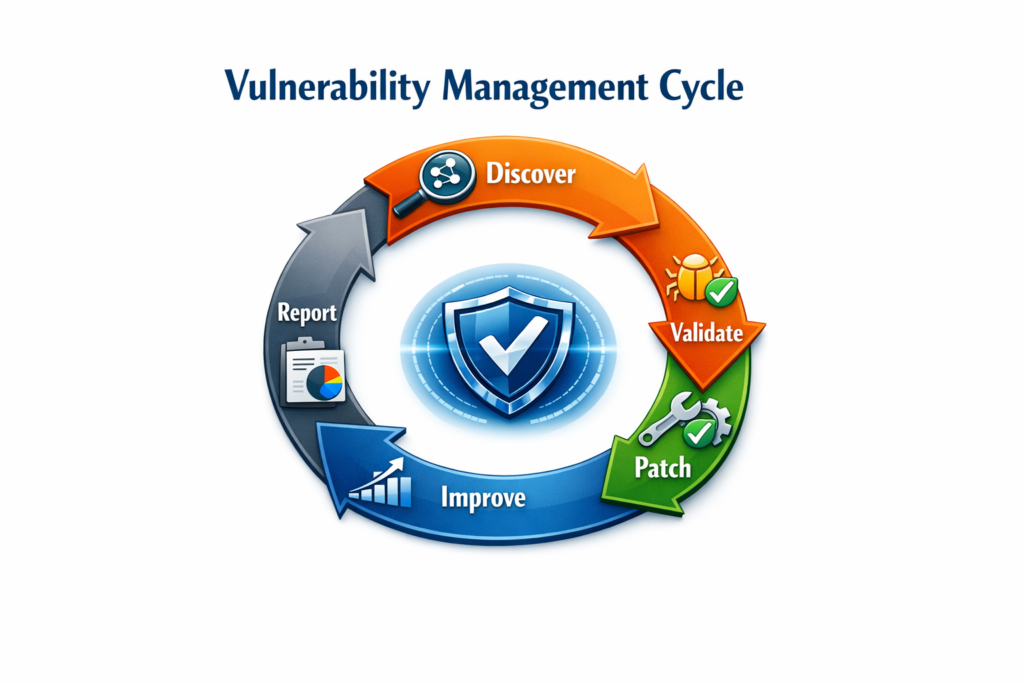
- Discover
- Validate
- Patch
- Improve
- Report
- Repeat
What distinguishes a strong program from a basic one is operational foundations, such as defined SLAs, a formal exceptions process, and a documented scope. These elements are essential for scalability, audit readiness, and program resilience.
By integrating scanning, automation, collaboration, and consistent reporting, you can build an effective program, even with limited resources.